Barebone Framework
Starting point
Barebone Framework Docs
Barebone Studio
Action
Access Control List (ACL)
Activerecord
Barebone URL's
Blokx
Browser Console
Build php classes with php classes
Condition
Config
Controller
Controller / Application Model
Console
Database
FastAPI
Filter $_POST
HTML
Inspector
JSON
JQGrid builder
Layouts
Log
Loggers
Map
Math
Model
Paginator
Pair
Process
Readers
Request
Response
ReRoute
Save as project
URL Helper
Views
ViewGroup
Writers
Zen coding
Barebone\JQGrid
jqGrid is an Ajax-enabled JavaScript control that provides solutions for representing and manipulating tabular data on the web. Since the grid is a client-side solution loading data dynamically through Ajax callbacks, it is integrated with PHP server-side technology.
Build it with the grid builder
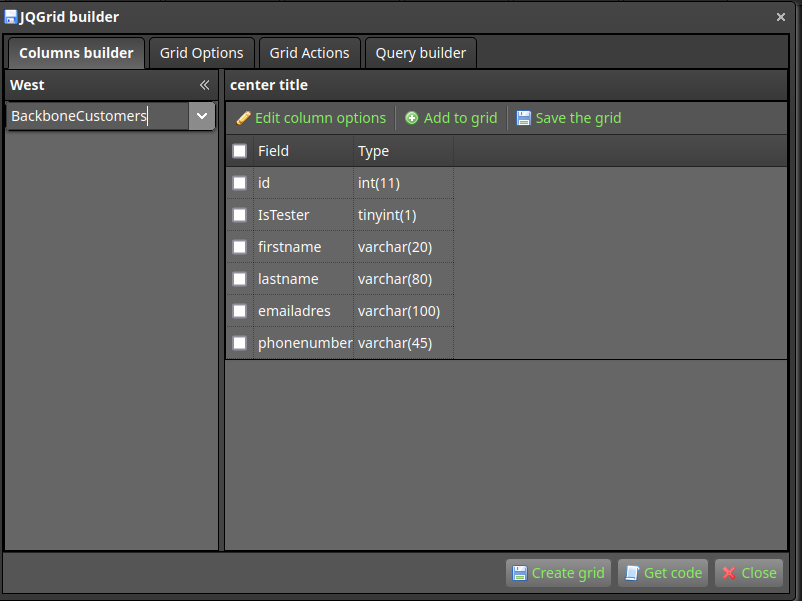
The builder creates a code like this.
    // create a grid object, pass in the controller to the grid.
    $grid = new Barebone\JQGrid5Model($this);
    // set url where to get the data
    $grid->url = '/jqgrid5/index/purephp/';
    // set select command
    $grid->select_command = "SELECT * FROM BackboneCustomers";
    // set the table that we use for the grid
    $grid->table = "BackboneCustomers";
    // we also have a subgrid
    $grid->subGrid = true; // set the subGrid property to true to show expand buttons for each row
    // datatype of the subgrid is json
    $grid->subgridtype = 'json'; // set the subgrid type to json
    // set url of the subgrid where to get the data
    $grid->subGridUrl = '/jqgrid5/index/subgrid/';
    // set the table that we use for the subgrid
    $grid->subGridTable = 'BackboneOrders';
    // create the columns
    $col = [];
    $col["title"] = "Id"; // caption of column, can use HTML tags too
    $col["name"] = "id"; // grid column name, same as db field or alias from sql
    $col["width"] = "20"; // width on grid
    $col["editable"] = false;
    $col["key"] = true;
    $cols[] = $col;

    $col = [];
    $col["title"] = "IsTester"; // caption of column, can use HTML tags too
    $col["name"] = "IsTester"; // grid column name, same as db field or alias from sql
    $col["width"] = "20"; // width on grid
    $col["editable"] = true;
    $cols[] = $col;

    $col = [];
    $col["title"] = "Firstname"; // caption of column, can use HTML tags too
    $col["name"] = "firstname"; // grid column name, same as db field or alias from sql
    $col["width"] = "20"; // width on grid
    $col["editable"] = true;
    $cols[] = $col;

    $col = [];
    $col["title"] = "Lastname"; // caption of column, can use HTML tags too
    $col["name"] = "lastname"; // grid column name, same as db field or alias from sql
    $col["width"] = "20"; // width on grid
    $col["editable"] = true;
    $cols[] = $col;

    $col = [];
    $col["title"] = "Emailadres"; // caption of column, can use HTML tags too
    $col["name"] = "emailadres"; // grid column name, same as db field or alias from sql
    $col["width"] = "20"; // width on grid
    $col["editable"] = true;
    $cols[] = $col;

    $col = [];
    $col["title"] = "Phonenumber"; // caption of column, can use HTML tags too
    $col["name"] = "phonenumber"; // grid column name, same as db field or alias from sql
    $col["width"] = "20"; // width on grid
    $col["editable"] = true;
    $cols[] = $col;

    // create options. These are defined in jqgrid JS
    $opt = [];
    $opt['viewrecords'] = true;
    $opt['rowNum'] = 10;
    $opt['sortname'] ='id';
    $opt['sortorder'] = 'asc';
    $opt['height'] = "auto";
    $opt['width'] = 800;
    $opt['modal'] = true;
    $opt['drag'] = false;
    $opt['resize'] = false;
    $opt['mtype'] = "POST";

    // pass the created columns to grid
    $grid->set_columns($cols);

    // set the options to the grid
    $grid->set_options($opt);

    //set the actions to the grid
    $grid->set_actions(array(
            "add" => true,
            "edit" => true,
            "clone" => false,
            "bulkedit" => false,
            "delete" => true,
            "view" => true,
            "rowactions" => true,
            "export" => false,
            "autofilter" => true,
            "search" => "simple",
            "inlineadd" => false,
            "showhidecolumns" => true
        )
    );
    // assign the grid variable to the view.
    // This will initial load the grid and loads the data depending on request
    // It is completly Create Read Update elete
    $this->view->grid = $grid->render('jqGrid');
Make sure you add the <?=$grid;?> variable to the view