Barebone\Config
In the barebone/config/application.json file you find settings of the barebone framework.
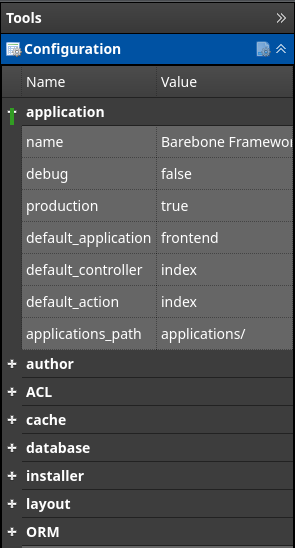
You can edit these in the editor sidebar "Tools > Configuration", or directly in the json file by clicking the icon  on the toolbar..
Source
<?php
$Config = new Barebone\Config();
// set value in section database.dbuser = 'dbusername'
$Config->setValue('database', 'dbuser', 'dbusername');
// get value from the section database.dbuser
echo $Config->getValue('database', 'dbuser'); // dbusername
// get value from the section author.name
echo $Config->getValue('author', 'name'); // eg "Not Sure"

// there is also a global function to do this shorter..

// set value in section database.dbuser = 'dbusername'
Config()->setValue('database', 'dbuser', 'dbusername');
// get value from the section database.dbuser
echo Config()->getValue('database', 'dbuser'); // dbusername
// get value from the section author.name
echo Config()->getValue('author', 'name'); // eg "Not Sure"
You probably never have to change these settings.
You might think to change debug and production. But that is easy done in index.php
Just before you $app->run(); your application you can enable or disable the debugger.
$app = new \Barebone\Application();
$app->disableDebugger(); // <-- disable debugger turns debug off and production on
$app->enableDebugger(); // <-- enable debugger turns debug on and production off
$app->run();
Description of the coniguration
{
  "application": {                        // barebone specific settings
    "name": "Barebone Framework",         // the name of the application
    "debug": "false",                     // if true the framework tells you when something goes wrong (do not use in production)
    "production": "true",                 // if true the framework hides all error messages (error_reporting(0))
    "default_application": "frontend",    // the default application that is loaded when none is given in url eg /.
    "default_controller": "index",        // the default controller that is loaded when none is given in url eg /blog/.
    "default_action": "index",            // the default method that is loaded when none is given in url eg /blog/show/.
    "applications_path": "applications/"  // where all applications are stored in barebone
  },
  "author": {                             // used when creating new pages
    "name": "Not Sure",                   // used in doc comments when creating new pages
    "email": "not-sure@example.com",      // used in doc comments when creating new pages
    "copyright": "©2024-Not Sure"         // used in doc comments when creating new pages
  },
  "ACL": {
    "enabled": "true"                     // enable/disable Access Control List
  },
  "cache": {                              // barebone framework caching
    "enabled": "false",                   // is cache enabled
    "cache_path": "cache/",               // where to store cache files. relative to barebone folder
    "enable": "false",                    // enable/disable cache
    "lifetime": 86400                     // the lifetime of the cached file in seconds
  },
  "database": {                           // database settings
    "dbuser": "",                         // database username
    "dbpass": "",                         // database password
    "dbname": "",                         // database name
    "dbhost": "localhost",                // database server
    "debug": "false"                      // database debugging
  },
  "barebone-gui": {                       // setting for the barebone GUI
    "configured": "true",                 // if false the install wizard will start
    "skin": "dark-green",                 // theme used for the GUI
    "theme": "monokai",                   // theme used for the editor
    "fontsize": "18px",                   // fontsize in the editor
    "outline_enabled": "true",            // when enabled right column Outline will show document outline
    "use_view_outline": "false",          // when enabled right column Outline will show view outline. this will execute the code in the controller. use with care.
    "autosave": "300",                    // automatically save all open files in the editor. if your browser crashes these files can be restored.
    "autocomplete": "true",               // enable/disable autocomplete in the editor (ctrl-space)
    "link_frontend": "/",                 // Toolbar "Frontend" button in GUI goes here..
    "link_backend": "/barebone/",         // Toolbar "Backend" button in GUI goes here..
    "header_username": "test",            // deprecated
    "header_password": "test"             // deprecated
  },
  "layout": {
    "default_layout": "default",          // default layout to use when none is defined in the controller
    "layouts_path": "layouts/"            // where all layouts are stored in public folder
  },
  "ORM": {
    "freeze": "true"                      // prevents changes with gardemooi beans
  }
}
Demystifying the Barebone Configuration File:
This JSON file serves as the central configuration hub for your Barebone framework application. It encompasses various settings that dictate how Barebone operates and interacts with your code. Here's a breakdown of the key sections:
1. application:
-
Defines crucial application details:
- name: The name of your application (e.g., "Barebone Framework").
- debug: Controls error reporting (set to "false" in production environments).
- production: Enables error suppression through
error_reporting(0)when set to "true". - default_application: The default application loaded if no application is specified in the
URL (e.g.,
/). - default_controller: The default controller loaded if none is provided in the URL
(e.g.,
/blog/). - default_action: The default method within the controller executed if no action is specified
(e.g.,
/blog/show/). - applications_path: The location of your application folders within the Barebone framework directory (typically "applications/").
2. author:
-
Stores information used during page creation:
- name: Your name, appearing in documentation comments.
- email: Your email address, included in documentation comments.
- copyright: Your copyright information, incorporated into documentation comments.
3. ACL:
- Manages access control (enabled by default with
"enabled": "true").
4. cache:
-
Controls caching behavior:
- enabled: Enables/disables caching (currently "false").
- cache_path: The directory where cached files are stored (relative to the Barebone folder, defaults to "cache/").
- enable: (Duplicates "enabled")
- lifetime: The duration (in seconds) for which cached files remain valid (86400 seconds is one day).
5. database:
-
Configures database connection details:
- dbuser: The database username.
- dbpass: The database password.
- dbname: The database name.
- dbhost: The database server hostname (defaults to "localhost").
- debug: Enables/disables database debugging (currently "false").
6. barebone-gui:
-
Stores settings relevant to the Barebone GUI (Graphical User Interface):
- configured: Indicates whether the installation wizard has been completed.
- skin: The theme used for the GUI.
- theme: The theme used for the code editor.
- fontsize: The editor font size.
- outline_enabled: Controls visibility of the document outline in the right column.
- use_view_outline: Enables displaying the view outline, which executes controller code.
- autosave: The time interval (in seconds) for automatically saving open editor files.
- autocomplete: Enables/disables autocomplete suggestions in the editor .
- link_frontend: The URL for the "Frontend" button within the GUI.
- link_backend: The URL for the "Backend" button within the GUI.
7. layout:
-
Defines layout-related settings:
- default_layout: The default layout used when no layout is specified in the controller ("default").
- layouts_path: The location of all layout files within the "public" folder (defaults to "layouts/").
8. ORM:
-
Contains Object-Relational Mapper (ORM) configuration:
- freeze: Currently set to "true," potentially preventing modifications related to "gardemooi beans" (further research might be needed to understand its specific function).
In conclusion, this JSON file provides a centralized location to manage various aspects of your Barebone application, encompassing settings for the application itself, author information, access control, caching, database connections, the graphical user interface, layouts, and object-relational mapping.
-
Barebone\Config
Barebone\Config extends Barebone\Filereaders\Json_file-
[P] $config : mixed
-
[M] getInstance() : void
-
[M] __construct( array $config ) : void
-
[M] __clone() : void
-
[M] createNewConfig() : void
-
Barebone\Filereaders\Json_file
Barebone\Filereaders\Json_file-
[P] $filename : string
-
[P] $values : array
-
[M] load_file() : void
-
[M] getValue( string $section, string $key ) : void
-
[M] setValue( string $section, string $key, mixed $value ) : void
-
[M] save() : void
-
-