Barebone\View
Unveiling the View's Habitat in the Barebone Framework:
The Barebone framework provides a clear and organized structure for storing views, ensuring they are easily located and managed within your application. Here's a deep dive:
The View's Address:
- Views reside in a designated folder named "views". This folder sits within the "application" directory of your specific application.
Meaningful Naming:
- Each view file carries a descriptive name that corresponds to the action it represents in the controller. This naming convention promotes organization and understanding.
Example:
index.phtml: This file represents the view for the "indexAction" in the controller.- Similarly,
create.phtmlwould be used by the corresponding action "createJQUERY" in the controller.
File Extension:
- The standard extension for view files in Barebone is ".phtml".
Illustration:
Imagine a "to-do list" application built using Barebone: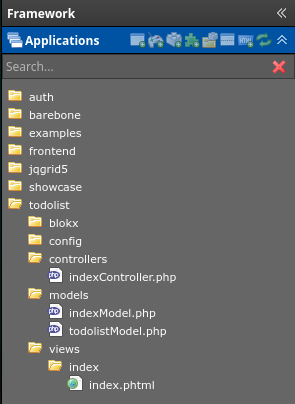
- The application directory structure would likely have a folder named "todolist" within the overarching "applications" folder.
-
Inside "todolist/views", you would find the following files:
index.phtml: Responsible for displaying all tasks.create.phtml: Handles adding new tasks.update.phtmlJQUERY: Doesn't require a view.
The Controller Connection:
- Controllers within the "todolist" application interact with these views to display relevant information based on user actions.
- For example, when a user opens the to-do list, the controller would likely render the
index.phtmlview to present all tasks.
Key Points:
- Understanding the location and naming convention for views is essential for efficient development and maintenance of your Barebone applications.
Beyond the Basics:
-
Some frameworks might offer additional features and functionalities within the view creation process. This could involve:
- Layout mechanisms: These allow you to define a common layout structure (header, footer, etc.) that can be shared across different views, reducing code duplication.
Remember:
- Grasping the concept of view location is crucial for building user interfaces and effectively displaying information in your Barebone applications.
- Explore the specific documentation and features provided by your chosen Barebone framework for a more comprehensive understanding of views and related functionalities.
This would be a folder and file structure for a simple todo application, with a webserver backend.
- todolist
- config
- controllers
- indexController.php
- indexAction
- createJQUERY
- updateJQUERY
- indexController.php
- data
- todo.json
- models
- views
- index
- index.phtml
- create.phtml
- index
This showcases a basic Todo List application built with a server backend and demonstrates how easy it is to get started with interactive features. Lets have a look at the final result of the application. Isn't that nice :)
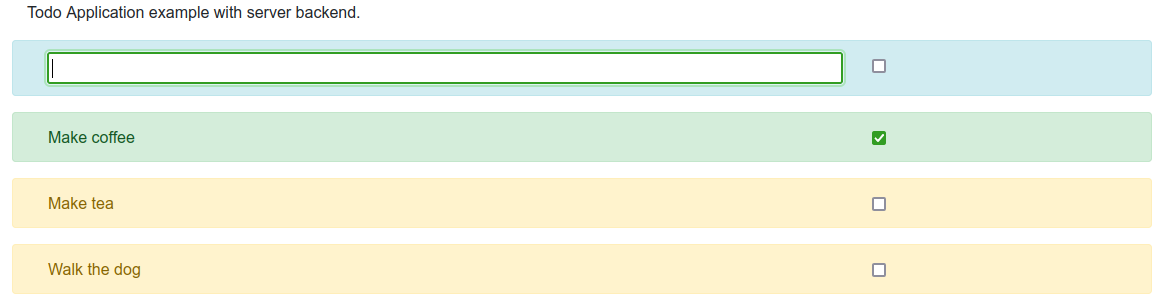
The data file is a json file which consists of this data:
{
  "todos": [
    {
      "todo": "Make coffee",
      "done": true
    },
    {
      "todo": "Make tea",
      "done": false
    },
    {
      "todo": "Walk the dog",
      "done": false
    }
  ]
}
The index.phtml view
<div class="container">

    <div class="row">
        <div class="col-xs-12 col-sm-12 col-md-12 col-lg-12">
            <p>Todo Application example with server backend.</p>
        </div>
    </div>

    <div class="row alert alert-info">

        <div class="col-xs-9 col-sm-9 col-md-9 col-lg-9">
            <input style="width:100%" id="new_todo" type="text">
        </div>
        <div class="col-xs-3 col-sm-3 col-md-3 col-lg-3">
            <input id="new_done" type="checkbox">
        </div>
    </div>

    <div id="todolist">
        <?php foreach ($todos as $key => $todo): ?>
        <div class="row alert <?=$todo->done?'alert-success':'alert-warning'; ?>" id="todo-<?=$key; ?>">
            <div class="col-xs-9 col-sm-9 col-md-9 col-lg-9">
                <?=$todo->todo; ?>
            </div>
            <div class="col-xs-3 col-sm-3 col-md-3 col-lg-3">
                <input class="ckb_todo_done" data-key="<?=$key; ?>" type="checkbox" <?=$todo->done === true ? 'checked' : ''; ?>>
            </div>
        </div>
        <?php endforeach; ?>
    </div>


</div>

<script nonce="<?=$this->nonce; ?>">
    $(document).ready(function() {

        $('.ckb_todo_done').click(function(e) {

            $.php('/todolist/index/update/', {
                key: $(this).data('key'),
                done: $(this).is(':checked') ? 'true': 'false'
            });
        });

        $('#new_todo').on('keyup', function(e) {
            e.preventDefault();
            // if enter key is released
            if (e.keyCode === 13) {
                // send new todo to controller
                // controller will add the new todo to the todolist
                $.php('/todolist/index/create/', {
                    todo: $('#new_todo').val(),
                    done: $('#new_done').is(':checked') ? 'true': 'false'
                });
            }
        });
    });
</script>
This page showcases a basic Todo List application built with a server backend and demonstrates how easy it is to get started with interactive features.
Structure and Appearance:
- The code utilizes the Bootstrap framework to structure the layout, as shown in this snippet:
<div class="container">
    </div>
The first .row is just a description. The seconds .row lets you create a new todo item
<div class="row alert alert-info">

    <div class="col-xs-9 col-sm-9 col-md-9 col-lg-9">
        <input style="width:100%" id="new_todo" type="text">
    </div>
    <div class="col-xs-3 col-sm-3 col-md-3 col-lg-3">
        <input id="new_done" type="checkbox">
    </div>
</div>
- Each todo item is displayed within a row with specific classes within the div#todolist for styling (color and formatting), like this:
<div id="todolist">
    <?php foreach ($todos as $key => $todo): ?>
    <div class="row alert <?=$todo->done?'alert-success':'alert-warning'; ?>" id="todo-<?=$key; ?>">
        <div class="col-xs-9 col-sm-9 col-md-9 col-lg-9">
            <?=$todo->todo; ?>
        </div>
        <div class="col-xs-3 col-sm-3 col-md-3 col-lg-3">
            <input class="ckb_todo_done" data-key="<?=$key; ?>" type="checkbox" <?=$todo->done === true ? 'checked' : ''; ?>>
        </div>
    </div>
    <?php endforeach; ?>
</div>
Adding & Marking Todos (Functionality):
- An input field allows you to enter new todo items, using this code:
<input style="width:100%" id="new_todo" type="text">
- A checkbox lets you mark completed tasks directly on the page, with this code:
<input id="new_done" type="checkbox">
Behind the Scenes (Server Communication):
- This example uses JavaScript to interact with the server-side code.
- When you enter a new todo and press Enter, JavaScript sends the text and checkbox state to the server using
$.php(specific to the framework being used), like this:
- When you enter a new todo and press Enter, JavaScript sends the text and checkbox state to the server using
$('#new_todo').on('keyup', function(e) {
    e.preventDefault();
    // if enter key is released
    if (e.keyCode === 13) {
        // send new todo to controller
        $.php('/todolist/index/create/', {
            todo: $('#new_todo').val(),
            done: $('#new_done').is(':checked') ? 'true': 'false'
        });
    }
});
- Similarly, clicking the checkbox on an existing todo item sends an update request to the server with the associated key and new checked state, like this:
$('.ckb_todo_done').click(function(e) {
    $.php('/todolist/index/update/', {
        key: $(this).data('key'),
        done: $(this).is(':checked') ? 'true': 'false'
    });
});
The controller would look like this. I am skipping the Model in MVC now and do datastorage on the controller. To keep it simple for now. You can read here more about models :)
use Barebone\Controller;

class indexController extends Controller{

    private Barebone\JSON $todosJSON;
    private array $todos = [];
    /**
    * This function gets called before all other functions in this controller.
    * So if you want to add stuff to the controller this is the place to do it.
    */
    function init(){

        $this->layout->set_layout('bootstrap4');
        $this->layout->add_javascript('/assets/thirdparty/jquery-php.js');
        // load the data into JSON object as soon as the init function is called upon creation
        $this->todosJSON = (new Barebone\JSON())->load_from_disk(__DIR__ . '/../data/todo.json');
        // get a handle on the array with todos
        $this->todos = $this->todosJSON->getData('todos');

    }

    /**
    * This function gets called after all other functions in this controller.
    * So if you want to clean up some stuff, this is the place to do it.
    */
    function terminate(){
        // during execution you can change $this->todos array
        $this->todosJSON->setData(['todos' => $this->todos]);
        // after execution we save the json file again
        $this->todosJSON->save_to_disk(__DIR__ . '/../data/todo.json');
    }

    /**
    * @param $args array of segments
    * @Application todolist
    * @Controller indexController
    * @Method indexAction
    */
    function indexAction( array $args = [] ){
        // starting point of the controller
        // set the title of the page
        $this->layout->title('Todo App');
        // assing the todos to the view
        $this->view->todos = $this->todos;
    }

    /**
    * The starting point for this action
    * @URI /todolist/index/update/
    * @Application todolist
    * @Controller index
    * @Action update
    * @param $args array of segments
    */
    function updateJQUERY(array $args = []){
        // first we make sure to only react to post requests since we access $_POST variable
        // checks $_SERVER['REQUEST_METHOD'] === 'POST'
        if($this->request->is_post(){
            // get data posted from the index page when user checks or unchecks a checkbox
            // key is the index in the "$this->todos" array
            $key = (int) filter_input(INPUT_POST, 'key', FILTER_UNSAFE_RAW);
            // done is 'true' of 'false' string!
            $done = (string) filter_input(INPUT_POST, 'done', FILTER_UNSAFE_RAW);
            // update the value in the array with key to value
            $this->todos[$key]->done = ($done === 'true' ? true : false);
            // depending on checkbox change color of the todo item
            if($done === 'true'){
                Barebone\jQuery('#todo-'.$key)->removeClass('alert-warning')->addClass('alert-success');
            } else {
                Barebone\jQuery('#todo-'.$key)->removeClass('alert-success')->addClass('alert-warning');
            }
        }
    }

    /**
    * The starting point for this action
    * @URI /todolist/index/create/
    * @Application todolist
    * @Controller index
    * @Action create
    * @param $args array of segments
    */
    function createJQUERY(array $args = []){
        // first we make sure to only react to post requests since we access $_POST variable
        // checks $_SERVER['REQUEST_METHOD'] === 'POST'
        if($this->request->is_post(){
            // new todo text
            $todo = (string) filter_input(INPUT_POST, 'todo', FILTER_UNSAFE_RAW);
            // new done checkbox
            $done = (string) filter_input(INPUT_POST, 'done', FILTER_UNSAFE_RAW);
            // craeate new todo object for json file
            $new_todo = [
                'todo' => $todo,
                'done' => ($done === 'true' ? true : false)
            ];
            // add new todo to "$this->todos"
            $this->todos[] = $new_todo;
            // assign new todo to view
            $this->view->todo = (object)$new_todo;
            // assign the key. Is total in "$this->todos" - 1
            $this->view->key = (count($this->todos) -1 );
            // this works just like jQuery
            // empty new tode field
            Barebone\jQuery('#new_todo')->val('');
            // append new todo to #todolist div in index page
            // loads contents of the view create.phtml into div#todolist
            Barebone\jQuery('#todolist')->append($this->view->get_html());
        }
    }

}
The create.phtml contains a html snippet that is getting loaded into an existing element on the index page.
<div class="row alert <?=$todo->done?'alert-success':'alert-warning'; ?>" id="todo-<?=$key; ?>">
    <div class="col-xs-9 col-sm-9 col-md-9 col-lg-9">
        <?=$todo->todo; ?>
    </div>
    <div class="col-xs-3 col-sm-3 col-md-3 col-lg-3">
        <input class="ckb_todo_done" data-key="<?=$key; ?>" type="checkbox" <?=$todo->done === true ? 'checked' : ''; ?>>
    </div>
</div>

<script nonce="<?=$this->nonce;?>">
    $(document).ready(function(){
        // make click event for new item in list. Since index only does this on page load
        $('input[data-key="<?=$key; ?>"]').click(function(e) {

            $.php('/todolist/index/update/', {
                key: $(this).data('key'),
                done: $(this).is(':checked') ? 'true': 'false'
            });
        });
    });
</script>
Note:
- This is a simplified example demonstrating the core concept. A complete implementation might involve additional functionalities like saving data persistently, handling errors, and implementing user accounts.
This code provides a basic framework for creating a simple todo list application. With further development, you can customize it to meet your specific needs and preferences.
Barebone\View
-
Barebone\View
Barebone\View extends Barebone\Component-
[P] $filename : string
-
[P] $flash : array
-
[P] $confirm : Barebone\Component
-
[P] $_extra_html : string
-
[P] $_output : string
-
[P] $nonce : string
-
[M] __construct( string $filename ) : void
-
[M] get_html() : string
-
[M] render() : void
-
[M] add_blokx( string $blokxname, array $data ) : void
-
[M] blokx( string $blokxname, array $data ) : void
-
[M] flash( string $message, string $type ) : void
-
[M] confirm( string $message, string $type, array $buttons ) : void
-
[M] errorcontainer( array $errors ) : void
-
[M] append( string $html ) : void
-
[M] getjQueryResponse( string $identifier ) : void
-
Barebone\Component
Barebone\Component-
[P] $properties : array
-
[M] __construct( mixed $data ) : void
-
[M] setData( mixed $data ) : void
-
[M] toArray() : array
-
[M] debug( mixed $data, bool $vardump, $cls_pre ) : void
-
[M] __set( string $name, mixed $value ) : void
-
[M] __get( string $name ) : void
-
[M] __isset( string $name ) : void
-
[M] sanitize_array( array $data ) : void
-
-